Hairstyle & Hair Color Changer
Interstellar Apps LLCBeauty
4.40.00 Reviews
- Version
- 1.0.10
- Installs
- 10.00K
- Age Rating
- Everyone
Screenshots
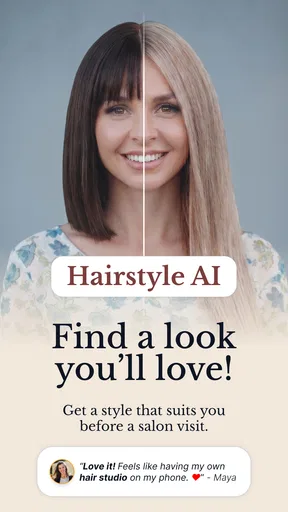
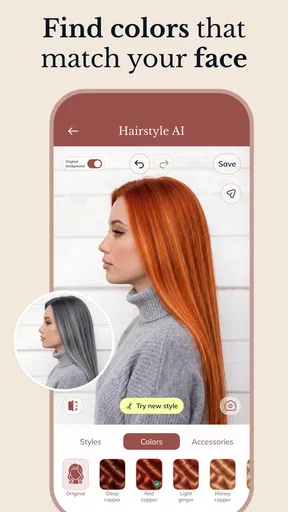
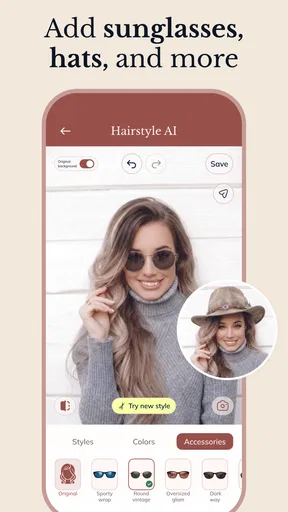
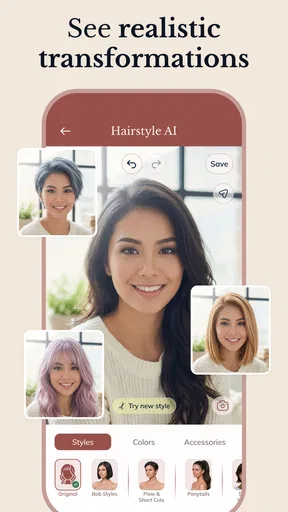
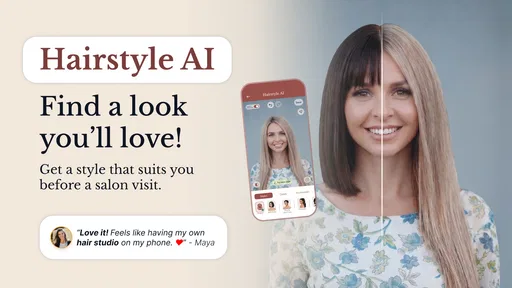
Our Review of Hairstyle & Hair Color Changer
 Analysis by Appyee
Trying a new haircut is easy to imagine and much harder to commit to. A photo can look convincing in a salon portfolio, yet the same cut may feel completely different on my own face. Hairstyle & Hair Color Changer takes a useful first step by letting me explore possible looks before making that real-world decision. I found it most valuable as a visual planning tool: not a replacement for a stylist, but a quick way to narrow down what I like, what feels too dramatic, and which color direction is worth discussing.
This is a free beauty app from Interstellar Apps LLC, with a store rating of 4.4 from more than two hundred ratings. Its central promise is broad rather than complicated: a large collection of hairstyle and hair-color combinations to try on a photo. The experience is aimed at curiosity, preparation, and experimentation, especially when I want to compare several ideas without searching through unrelated images online.
Exploring looks when a connection is part of the experience
I look at connection-dependent browsing as a planning detail rather than a reason to abandon the idea: when I have reliable service, I can use a session to compare a few options, then pause and consider which ones still appeal to me later. That small break helps separate a genuine preference from the excitement of trying something new, and it makes the handoff to a stylist more focused.
Why the first session feels more useful than a simple gallery
The appeal is not just seeing attractive hairstyles. The practical benefit comes from placing different possibilities into the same personal decision. I can look at a shorter shape, a different fringe, or a bolder color and judge the overall impression against my own features. That makes the app more useful than endlessly scrolling through salon photos, where the model, lighting, styling, and camera angle are all different from mine.
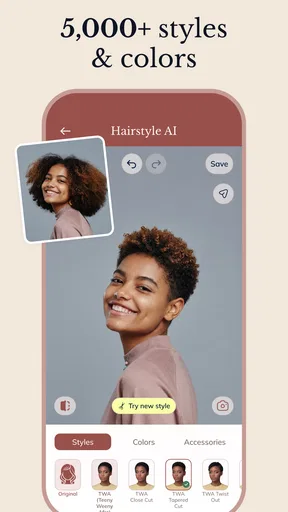
The large selection also changes how I approach the process. Instead of deciding immediately that I want “short hair” or “blonde hair,” I can move through nearby variations and notice the details that actually matter: how much forehead is visible, whether the sides make the face look longer, or whether a color feels wearable rather than merely striking. The app’s collection of over five thousand combinations gives that comparison process plenty of room, although the number itself can make casual browsing feel less focused.
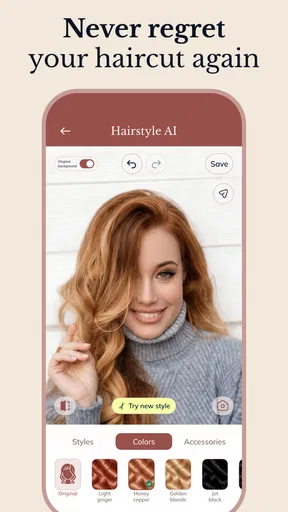
In my experience, this kind of visual exploration is most rewarding when I start with a question. For example, I might compare a shoulder-length style with a cropped option, then test a warmer and cooler color on the style I prefer. Without that small plan, a large catalog can turn into random tapping. A useful trick is to keep the first pass broad and the second pass selective: identify a few shapes first, then spend time examining color choices only on those finalists.
What network-dependent moments mean in practice
Because the experience involves browsing a substantial library and working with visual content, I would use it with a dependable connection whenever possible. A weak mobile signal can make an exploratory session feel interrupted, particularly when I am trying to move quickly between ideas. I would not treat it like a fully self-contained reference book that I can confidently plan around in every offline situation; the safest approach is to open it before an appointment or while connected to a reliable network.
This matters in ordinary situations. If I am sitting in a salon waiting area, I may have only a few minutes to settle on a direction. If the connection is inconsistent, spending that time waiting for content is frustrating and can encourage a rushed choice. I prefer to browse at home, where I can compare calmly, then show my preferred visual references to the stylist. That workflow makes the app part of preparation rather than something I depend on at the exact moment a decision must be made.
Connectivity also affects patience. A visual tool feels immediate when each choice appears smoothly, but delays are more noticeable when the entire point is quick experimentation. I would avoid judging the app solely from one poor session on crowded public Wi-Fi. At the same time, users who regularly have limited data or unreliable service should factor that into the decision, because the app’s main value depends on being able to explore its visual material without constant interruption.
Using it comfortably on a phone
This is the kind of app I would open on a phone while standing in front of a mirror, sitting on public transport, or waiting for an appointment. Those short sessions are ideal for collecting ideas, but they are not always ideal for making a final decision. A small screen can make subtle differences in hairline placement, texture, or color harder to judge, especially when the image is viewed quickly.
For a more reliable comparison, I would use the same photo while testing several options. Changing the image between attempts makes it difficult to know whether the hairstyle is responsible for the difference or whether lighting and expression are influencing my reaction. A neutral, well-lit image is more useful than a heavily filtered selfie because it gives me a steadier baseline.
I also recommend looking at the result from a little distance instead of zooming in immediately. At close range, I tend to focus on whether the hair overlay looks perfectly natural. From farther away, I can judge the more important question: does the overall shape suit the face? That distinction prevents me from rejecting an idea because of a minor visual imperfection that would not matter in everyday life.
A realistic everyday workflow before a salon visit
Imagine that I have a haircut booked for the weekend but cannot decide whether to keep length around the face. I would begin by trying several lengths with a consistent photo, ignoring color at first. Once I have two or three shapes that seem plausible, I would compare a restrained color change with a more noticeable one. Then I would save or otherwise keep track of the strongest visual references available in my session and bring the discussion back to practical questions: maintenance, styling time, and whether my current hair can reach the shown result.
This workflow is more useful than asking the app to make the decision for me. It helps me arrive at the salon with vocabulary and visual direction, while leaving the technical judgment to someone who can inspect my actual hair. A virtual preview cannot account perfectly for density, curl pattern, damage, growth history, or the difference between a freshly styled finish and an ordinary morning.
Where the app can fail and how I would recover
Any photo-based hairstyle preview can look less convincing when the source image is poorly suited to the task. Hair covering the face, a strong side angle, harsh shadows, or an expression that changes the apparent face shape can all make comparisons less dependable. When a result looks strange, I would first change the photo rather than immediately deciding that the hairstyle itself is wrong.
My recovery process would be simple: return to a clear image, keep the head position as straightforward as possible, and test a familiar style before moving to a dramatic one. A familiar option acts as a reference point. If several ordinary choices look proportionate but one extreme style looks awkward, the problem may be the match between the image and that particular design rather than a general issue with the session.
Connection problems deserve the same calm approach. If browsing stalls, I would stop repeatedly tapping and try again later on a stronger network. Repeated retries can waste mobile data and make it harder to tell whether the app is responding. For an important appointment, I would not rely on last-minute discovery. I would prepare the shortlist earlier, when there is time to recover from loading delays or an unhelpful photo.
Being careful with personal photos and mobile data
Photo-based beauty tools naturally encourage me to use personal images, so I would be deliberate about which picture I choose. A simple, recent photo is usually enough for visual comparison; there is no need to use an image containing friends, children, or identifiable surroundings. Keeping the frame uncomplicated also makes the result easier to interpret and reduces the amount of unrelated personal information in the image.
I would also pay attention to the difference between Wi-Fi and mobile data. Browsing many visual combinations can be a poor fit for a limited data plan, especially when I am experimenting without a clear stopping point. My practical habit would be to do the broad exploration on Wi-Fi, then use mobile data only for a short review of ideas already selected. That is not about avoiding the app; it is about making the session intentional instead of letting endless browsing consume connectivity.
The free entry point makes it easy to try the experience before deciding whether it belongs in my routine. However, in-app purchases are listed at $14.99 per item, so I would pay attention before confirming anything that appears locked or optional. The price is significant enough that I would first establish whether the available selection already supports my goal. If I only want inspiration for one haircut, a paid item may not make sense; if I repeatedly experiment with styles and find a particular addition genuinely useful, the decision becomes more personal.
Who will get the most from it
I think the app suits people who enjoy visual comparison and want a low-pressure way to prepare for a change. It is especially helpful for someone who keeps changing their mind, someone considering a color they have never tried, or someone who needs a few concrete references before speaking with a stylist. It can also be useful when two people are discussing a change together and need something more specific than “make it shorter.”
The Everyone content rating makes it approachable for a broad audience, but suitability still depends on expectations. A younger user may enjoy experimenting, while an adult should still remember that a preview is not a guarantee of salon results. The app is best used to start a conversation, not to pressure a stylist into reproducing a digital image exactly.
Who should choose another approach
I would skip it if I wanted professional consultation, detailed hair-care guidance, or an accurate prediction of how a specific cut will behave after washing and air-drying. A stylist, especially one familiar with my hair texture and face shape, is better for those questions. I would also choose a standard image search or salon portfolio when I need to study real texture, movement, and finish rather than a quick personal preview.
It may also be the wrong fit for someone who dislikes browsing large collections. The wide range is a strength for experimentation, but it can create decision fatigue. If I already know the exact cut and color I want, opening the app may add more alternatives than I need. In that case, a direct conversation with a stylist and a few carefully chosen real photographs would be more efficient.
How it compares with familiar beauty-app alternatives
Compared with a general photo editor, this app is more focused on the specific problem of choosing a hairstyle or hair color. A general editor may offer broader creative controls, but it can require more manual work and does not necessarily organize ideas around a haircut decision. Here, the advantage is the dedicated browsing experience and the ability to think in combinations rather than isolated effects.
Compared with social-media inspiration, the app is less dependent on finding the right search phrase or following a trend. Social platforms are better for seeing real hair in motion and discovering current styling ideas, while this tool is better for testing a direction against my own image. I would use both differently: social content for realism and context, this app for narrowing personal options.
Compared with a salon consultation, it is faster and more private, but much less authoritative. It cannot replace an assessment of hair condition, previous color, maintenance demands, or the skill required to create the look. That trade-off is exactly why I find it useful: it reduces uncertainty before the consultation, but it should not be mistaken for the consultation itself.
Version, access, and the overall feel
The current version is 1.0.10, and the app runs on Android 7.0 or later. That makes it accessible to many older Android phones rather than limiting the experience to recent hardware. Even so, the quality of a session will depend on more than the operating-system requirement: screen size, camera quality, available storage, and network reliability can all affect how comfortable visual experimentation feels.
With more than ten thousand installs, it has reached a modest but real audience, and the 4.4 average suggests that many users find the central idea worthwhile. I would interpret that positively without treating the rating as a promise that every photo or connection will produce a perfect result. My own judgment is more conditional: the application is strongest when I use it as a structured brainstorming tool, with a good photo, a stable connection, and realistic expectations.
My connectivity verdict
Hairstyle & Hair Color Changer is worth trying if I want to explore a new look before making a commitment. Its free starting point, focused beauty category, and broad combination-based approach make it more practical than guessing from a haircut name alone. I especially like the way it can turn a vague idea into a small shortlist that I can discuss with a professional.
The main caution is that the experience is not something I would plan around during a network-poor moment. I would browse ahead of time, use a consistent photo, avoid wasting mobile data on unfocused scrolling, and treat any paid item carefully because each in-app purchase is $14.99. Those habits make the app feel more controlled and reduce the chance that connectivity or impulse spending will shape the decision.
My recommendation is simple: use it to discover and compare, then use real-world advice to decide. If that matches what I want from a beauty app, Hairstyle & Hair Color Changer offers a convenient way to make the first step less intimidating. If I need technical accuracy, detailed consultation, or a realistic view of hair texture, I would move on to a stylist, a real salon portfolio, or both.
Verdict
Strengths of Hairstyle & Hair Color Changer
- Offers many hairstyle and hair color options to try virtually.
- Simple controls make basic edits quick for beginners.
- Useful for comparing looks before visiting a salon.
- Lets you experiment without making permanent changes.
- Suitable for sharing makeover ideas with friends or stylists.
Limitations of Hairstyle & Hair Color Changer
- Results may look artificial on some face shapes or photos.
- Accurate previews depend on using a clear, front-facing image.
- Some styles, colors, or tools may require in-app purchases.
- Hair overlays can misalign when the original photo has movement.
- Privacy details should be reviewed before uploading personal photos.
Similar Picks in This Category
View All
Beauty Makeup Editor & Camera
Photo & Video Editors - Instant Solution4.7

Perfect365: Face Makeup Editor
Perfect365, Inc.3.5

Mirror Plus - HD Mirror app
Digitalchemy, LLC4.8

Cute Lock Screen & Wallpapers
Prometheus Interactive LLC4.6

HD Camera for Android
One Music Player4.5

Phone Mirror app - True Mirror
Cards4.6
Frequently Asked Questions
What is Hairstyle & Hair Color Changer, and what can I do with it?
Hairstyle & Hair Color Changer is a photo-editing app designed to help you preview different hairstyles, haircuts, and hair colors using a portrait or selfie. After adding an image, you can experiment with short, long, curly, straight, layered, and other styles, as well as shades such as blonde, brown, red, and fantasy colors. It is mainly intended for visual inspiration rather than professional salon-level simulation.
How do I use my own photo in Hairstyle & Hair Color Changer?
You can generally begin by taking a new selfie with your device camera or selecting an existing portrait from the gallery. For the most convincing results, use a clear, front-facing image with good lighting and your hair visible around the face. Depending on the version, you may need to crop or align the photo before applying a style. Images with hats, heavy shadows, or extreme angles may produce less accurate overlays.
Are the hairstyle and hair-color results realistic?
The app can provide a useful idea of how a different look might suit you, but the results should not be treated as an exact prediction. Hair overlays may appear more natural on well-lit, front-facing photos, while edges, facial alignment, and existing hair texture can sometimes look artificial. Color previews are also affected by the original image lighting, so it is best to use the edits as inspiration before making a real change.
Is Hairstyle & Hair Color Changer free to download and use?
The app may be available as a free download, but some hairstyles, color options, editing tools, or export features can be restricted behind advertisements, in-app purchases, or a subscription. Availability may differ between Android and iOS and can change with updates. Before downloading, check the store listing for the current pricing, trial terms, and whether recurring subscription charges apply after any introductory period.
Does the app protect my photos and personal information?
Before uploading personal images, review the app’s privacy policy and the permissions requested on your device. Some editing may happen directly on the phone, while other versions may process images through online services. Avoid using photos that contain other people or sensitive information unless you understand how they are handled. Also check whether the app requests access to your camera, photo library, storage, or other features that are not necessary for its main purpose.
